Dipole Antenna for Portable Use – Make your own!

A dipole antenna is a basic radio antenna made of two conductive elements fed at the center. It is typically a half-wavelength long and is widely used as a reference antenna in antenna theory and practice.

Dipole antennas work by converting alternating current into electromagnetic waves. Their radiation pattern is strongest perpendicular to the antenna and weakest along its axis, forming a donut-shaped pattern in three dimensions.

The orientation of a dipole antenna determines its polarization. A horizontal dipole produces horizontally polarized waves, while a vertical dipole produces vertically polarized waves. Matching polarization improves signal strength.

A half-wave dipole has an impedance of about 73 ohms in free space, which closely matches common coaxial cables. Proper impedance matching improves efficiency and reduces signal reflections.

When a dipole is installed close to the ground, near objects, or in an inverted-V shape, its impedance naturally drops from ~73 ohms toward 50 ohms. Many real-world dipoles end up near 50 ohms without extra components.

A folded dipole has about 300 ohms impedance, but using a 4:1 balun converts it to 75 ohms, and further matching can bring it to 50 ohms if needed.

Common types include half-wave, folded, short, and inverted-V dipoles. Dipole antennas are used in FM radio, television, amateur radio, and as components of directional antenna arrays.

My Antenna

Below is the antenna I made and tested. This video will show you how I did it, and why. I share some tips I learned along the way. But I would also value your thoughts.

The app I used to get the measurements from is this one:

https://play.google.com/store/apps/details?id=com.daveyhollenberg.amateurradiotoolkit

However you can get lots of different apps that will do this. Or you can use the simple formula to work it out in metric or imperial.

My portable setup

Below are some videos on my portable setup which you may enjoy.


If you enjoyed this read, below are some you may also enjoy.

  • Antennas
    Amateur radio operators use many different antenna types, each designed for specific bands, space limits, and operating goals. Here’s a clear overview of the most common ones and why hams choose them. Wire Antennas These are some of the simplest and most popular antennas that include:…
  • Dipole Antenna for Portable Use – Make your own!
    A dipole antenna is a basic radio antenna made of two conductive elements fed at the center. It is typically a half-wavelength long and is widely used as a reference antenna in antenna theory and practice. Dipole antennas work by converting alternating current into electromagnetic waves.…
  • Interference
    Interference in Amateur Radio refers to unwanted signals that disrupt radio communication. This interference can reduce signal clarity, make contacts difficult, or completely block communication between amateur radio operators. Radio Frequency Interference (RFI) is one of the most common problems in amateur radio. It often comes…
  • 6m and TV Channel 0
    Prior to 1989, it was illegal to operate between 50 MHz and 52 MHz in Australia. It was a real pain as that was where all the action was when the band opened up. However, after many requests from the WIA to the DoTC back in…
  • Dipole Antennas Vs Long Wire Antennas
    I’ve heard a lot about dipole antennas, and I’ve heard a lot about long wire antennas also. I would say I’ve seen more dipoles than long wire antennas. So why is that? What is the difference between them? Which is better? If one is a clear…
  • Repeater-START
    Repeater-START is a multi-platform app designed for ham radio and radio-operator enthusiasts who need fast access to repeater information. The app provides a detailed repeater map as well as a distance-sorted list, allowing users to easily locate nearby communication points wherever they travel. Because it uses…
  • The 6-Meter Amateur Radio Band
    What Is the 6m Band? The 6-meter band, spanning roughly 50–54 MHz, is a section of the VHF spectrum assigned to amateur radio operators. Its wavelength is six meters, and its position between HF and VHF makes it behave like a mix of both services. Why…
  • Anytone AT-778UV
    Overview The Anytone AT-778UV is a dual-band VHF/UHF mobile transceiver designed for amateur radio operators. It operates on the 136–174 MHz (VHF) and 400–490 MHz (UHF) bands, offering reliable two-way communication for both ham radio and commercial use (depending on firmware version). Power Output This transceiver…

DXHeat.com

DXHeat.com is a great website that can update you the current conditions on each band. The website has filtering of incoming DX Spots which can be displayed instantly using great graphical tools.

From the main landing page dxheat.com you can do a search by call sign or open DX Cluster. You can also scroll down to see more information.

Callsign Search

By typing in a call sign, you will see a lot of information instantly about that person. Some of the graphs are interesting as it shows how often the selected user does DX Spots by date, by band and what Continent they have been heard in.

It then shows what DX spots this user as submitted by time, band, and Continent.

DX Cluster

This is the best part of the website.

In the middle you can see live data. You can apply filters as required on the left side. On the right is the current UTC time and a lot of other interesting things.

On the right is a Propagation box which is helpful.

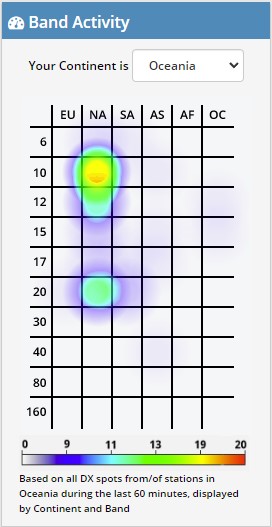
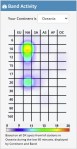
Also on the right is a Band Activity box which is great and perhaps the best part of the website.

This graph is powerful and shows you instantly where the bands are open.

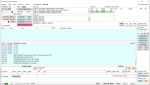
Select your area via the drop-down box. I have selected Oceania in the example shown. You can see the band is open on 10 metres to NA, which is North America, and slightly open to NA on 20 metres also.

10 minutes before I took this screen dump, 10 metres was in the red to North America, so it changes live. 10 minutes after this screen dump, 20 metres was in the purple meaning conditions were getting harder, however 10 metres became a solid red.

20 minute later after the above screen dump, I took the following one on the right.

Now you can see 10 metres to North America is strong, and 20 metres is not even showing anymore. 15 metres is also on the graph now potentially growing in strength.

Asia is also starting to show signs of colour on 17 metres which it wasn’t before.

While these graphs are powerful, they are limited to the amount of activity on the band. For example, if no one picks up a microphone, then there is still no one to listen to.

It is a great starting point though and displayed very well. I would love to embed this on my QRZ page if anyone knows how.

The main text in the screen, you can hover over the green boxes and filter according to that box. Up towards the top, there is a mode section on the left side with green boxes, you can filter by them also. You can filter via region and band also.

Login

At the top of the screen is a login/sign up option. I would encourage you to create an account. Simply put in your email and password, then confirm it and you will be able to update your profile. You will then have an opportunity to adjust your display DX-Cluster settings as you like.

Other websites

There are other websites that show similar information in a different format that include:

Other interesting reads:

Did you enjoy this read, below are some other interesting topics you may enjoy also:

  • Antennas
    Amateur radio operators use many different antenna types, each designed for specific bands, space limits, and operating goals. Here’s a clear overview of the most common ones and why hams…
  • Dipole Antenna for Portable Use – Make your own!
    A dipole antenna is a basic radio antenna made of two conductive elements fed at the center. It is typically a half-wavelength long and is widely used as a reference…
  • Interference
    Interference in Amateur Radio refers to unwanted signals that disrupt radio communication. This interference can reduce signal clarity, make contacts difficult, or completely block communication between amateur radio operators. Radio…
  • 6m and TV Channel 0
    Prior to 1989, it was illegal to operate between 50 MHz and 52 MHz in Australia. It was a real pain as that was where all the action was when…
  • Dipole Antennas Vs Long Wire Antennas
    I’ve heard a lot about dipole antennas, and I’ve heard a lot about long wire antennas also. I would say I’ve seen more dipoles than long wire antennas. So why…
  • Repeater-START
    Repeater-START is a multi-platform app designed for ham radio and radio-operator enthusiasts who need fast access to repeater information. The app provides a detailed repeater map as well as a…
  • The 6-Meter Amateur Radio Band
    What Is the 6m Band? The 6-meter band, spanning roughly 50–54 MHz, is a section of the VHF spectrum assigned to amateur radio operators. Its wavelength is six meters, and…
  • Anytone AT-778UV
    Overview The Anytone AT-778UV is a dual-band VHF/UHF mobile transceiver designed for amateur radio operators. It operates on the 136–174 MHz (VHF) and 400–490 MHz (UHF) bands, offering reliable two-way…
  • 160 Meters Band
    160 meters band is known as the “Gentlemen’s band”. It is right next to the AM commercial band, known as medium wave. The 160-meter band is the radio frequencies between…
  • What does this Antenna do?
    Have you ever had an antenna and forgotten what it is for? Maybe you have been given one and wasn’t told exactly what it was used for. I got given…

Solar Data & Propagation

There are several website that tell you what bands are open in your area. Most people paste them on their QRZ page, but there are some examples below that update every hour.

You can see more on their webpage https://www.hamqsl.com/solar.html where all you have to do is paste the code and put on your website. There is a great option to donate also. There is a wealth of information on this website that you can spend hours on.

This data is updated every hour, which is fantastic.

But what if you are not in front of your PC and want to look it up. There is a handy little app I use called Solar Data and Propagation. It is a small app only 12.5Mb in size on the iPhone and it is free. It is also available on Android at only 6.75Mb, I will talk about further down.

Below is the app on an apple device.

While it is only a little app, and doesn’t do a lot, it is a simple app that gives you what propagation is open at your current location. While other apps have heaps of features and functions that you may or may not use often, this little app has just what you would use often.

Above are the HF conditions, but you can also see VHF conditions and terrestrial. Adds do pop up from time to time, but the app is free so I don’t see this as a problem.

You can download it from the App Store.

Android

If you have an Android device, go to the store and search for HF Propagation. It should be the first one on the list with an orange sunshine as the logo.

Once installed, you have a lot of different options available on the first screen.

Scroll down, and you will see the HF then VHF conditions as mentioned for the Apple app.

Conclusion

This little information may save you from running out to the shack and turning everything on to find nothing or trying on the wrong band. As mentioned above, it can be on an apple or android device.

Hopefully, this makes it a little easier for you. Please put in the comments below what apps you enjoy using or let me know what you think.

Happy DX-ing, hopefully we talk on the air soon.

Some other posts that are similar

  • Repeater-START
    Repeater-START is a multi-platform app designed for ham radio and radio-operator enthusiasts who need fast access to repeater information. The app provides a detailed repeater map as well as a distance-sorted list, allowing users to easily locate nearby communication points wherever they travel. Because it uses open repeater databases, the information remains current, community-supported, and…
  • EchoLink CQ
    I’ve been using EchoLink well before smartphones where the only way I knew how to connect to a different station was via the radio. The internet wasn’t as extensive as it is now and you had to dial the node you wanted via the radio. You can still do this today but I don’t think…
  • Solar Data & Propagation
    There are several website that tell you what bands are open in your area. Most people paste them on their QRZ page, but there are some examples below that update every hour. You can see more on their webpage https://www.hamqsl.com/solar.html where all you have to do is paste the code and put on your website.…
  • HamAlert
    It has been a while since I have completed another update, but I have a lot in the making. A broken finger has kept me quiet! HamAlert is an app for both iPhone and Google devices that alerts you as to when a desired station appears on the DX cluster, the Beacon Network, SOTAwatch, POTA…
  • DROID-Star
    After talking to a friend just to the north of me, he told me about the app DROID-Star for Android. As I only have apple devices, this wasn’t initially an option for me, however I do have an Android TV box which I use for Amateur Radio, so will review it from that device. At…
  • WizNet DMR
    The WizNet DMR app is still in beta testing, and at the time of writing this, you have to not only have a currently have a licence as an Amateur Radio Operator, but approved to be part of the beta testing group. You can do this by googling the web site, submitt a few details,…
  • Orion Push to Talk
    Orion is an app that isn’t really known in my world, perhaps because it isn’t available on all platforms, or because it does transmit your exact location to everyone on the channel. However there are some benefits to this mode and does add another communication mode to your list. You can also create your own…

Basic Antenna Fundamentals

A good friend of mine, Mike VK5ZC, put the information below together and asked me to put it on my web site. He has spent a lot of time putting it together with pictures and videos, so I encourage you to have a good read.

Topics include:

  • What is an antenna
  • Antennas types and general usage
  • Video of Antenna Propagation
  • The Antenna Mechanism
  • Antenna Resonance & Bandwidth
  • “Q” factor
  • Directional patterns of antennas
  • Video of Antenna Directivity
  • Gain of Antennas
  • Impedance matching
  • Vertical & Horizontal Polarization
  • Balun basics, Unun & Ugly Balun
  • SWR and Video
  • Coaxial cables and feed lines
  • The Velocity factor
  • Plugs and Connectors

Open the PDF document here:

So what did you think of this document? Please leave your comments below.

Mike also wrote a document that has the full history of Amateur Radio. You can read that here.

Want to read something similar:

If you enjoyed that read, here is some more posts we have on this site.

Antenna fun