Antennas

Amateur radio operators use many different antenna types, each designed for specific bands, space limits, and operating goals. Here’s a clear overview of the most common ones and why hams choose them.

Wire Antennas

These are some of the simplest and most popular antennas that include:

Dipole Antennas

  • Two equal wire sections fed in the center
  • Very efficient and easy to build
  • Works well on HF bands
  • Often used as a first antenna

End-fed wire

  • Fed at one end instead of the center
  • Easy to install in limited space
  • Needs a matching unit (tuner or transformer)

Inverted-V

  • A dipole with the center high and the ends sloping down
  • Takes up less horizontal space
  • Good all-around performance

Vertical antennas

Vertical antennas stand upright and radiate equally in all directions.

  • Popular for HF, VHF, and UHF
  • Good for DX (long-distance) contacts
  • Require a good ground system or radials
  • Common on small lots or rooftops

Verticals are great when you want omnidirectional coverage without rotating an antenna.

Directional antennas

These antennas focus energy in specific directions. They include:

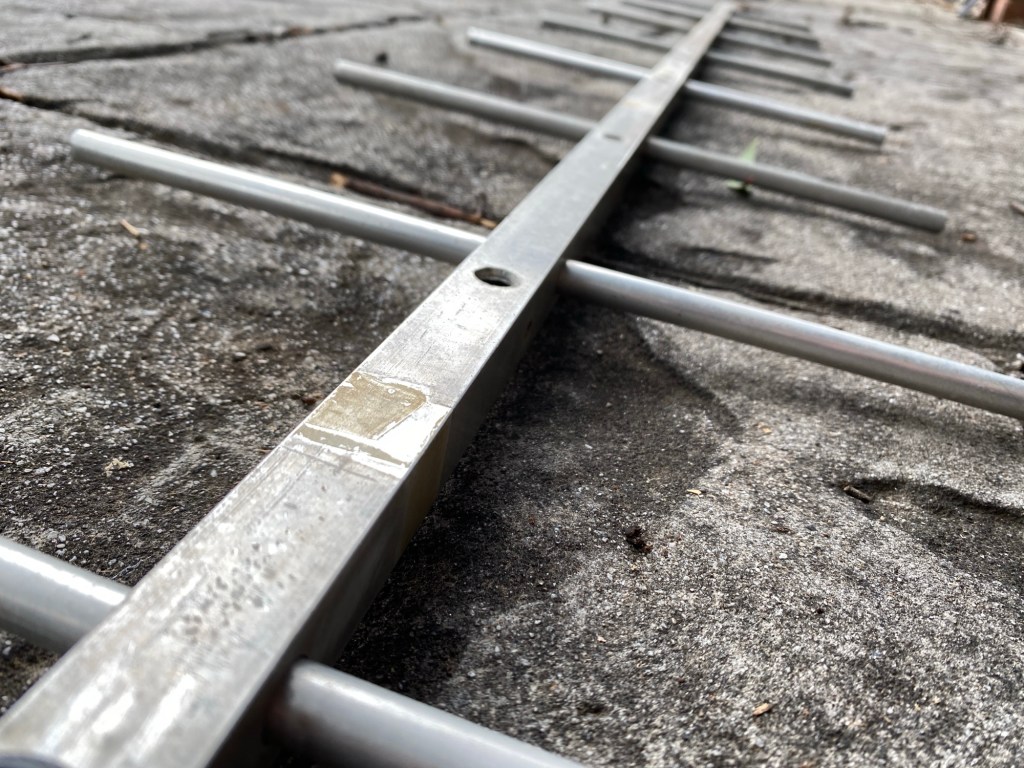
Yagi Antennas

  • One driven element with reflector(s) and director(s)
  • High gain and directivity
  • Common on HF, VHF, and UHF
  • Usually mounted on towers and rotors

Beam Antennas

  • General term for directional antennas
  • Help reduce noise and interference
  • Ideal for contesting and DXing

Loop antennas

Loop antennas use a closed loop of wire or tubing. They include:

Full-wave loops

  • Large, efficient, and low noise
  • Often used on HF bands

Magnetic loops

  • Much smaller
  • Useful in apartments or noisy environments
  • Narrow bandwidth, needs careful tuning

VHF/UHF antennas

Used mainly for local and line-of-sight communication. They include:

Ground-plane

  • Simple vertical antenna
  • Common for 2 m and 70 cm

Collinear

  • Stacked vertical elements
  • More gain for repeater and FM use

Handheld “rubber duck”

  • Compact and portable
  • Less efficient but very convenient

Portable and special-purpose antennas

  • Whip antennas for mobile use
  • NVIS antennas for regional HF coverage
  • Stealth antennas designed to be hidden
  • Satellite antennas (often crossed Yagis)

Choosing the right antenna

Amateur Radio Operators usually decide what antenna to used based on:

  • Available space
  • Frequency bands
  • Operating style (local, DX, portable)
  • Budget and installation limits

A simple, well-installed antenna often outperforms a complex one installed poorly.

How do I increase Antenna Gain?

Increasing antenna gain means focusing the radio signal more efficiently rather than increasing transmitter power. One of the most effective ways is to use a directional antenna, like a Yagi or beam, instead of an omnidirectional antenna such as a dipole or vertical. Directional antennas concentrate energy in a specific direction, providing stronger signals and reducing interference from unwanted directions.

You can also look at mounting your antenna higher. The old thought of Height is Might come into play. It’s true to a point, especially if you go higher and can now talk over obstacles like hills or buildings.

Another way to increase gain is by adding more elements to antennas like Yagis. Each additional director slightly increases forward gain, allowing for stronger transmission over long distances. Similarly, antenna height plays a major role in effective gain: raising antennas above obstacles improves the radiation angle, enhances long-distance (DX) contacts, and benefits line-of-sight communication on VHF and UHF bands.

Advanced techniques include stacking antennas, where two or more identical antennas are combined with proper spacing and phasing to achieve extra gain. Even without changing antennas, improving efficiency can boost effective gain. This includes using low-loss coax, keeping feedlines short, installing sufficient radials for verticals, and tuning the antenna to achieve a low SWR, which ensures most energy is radiated rather than lost.

In short, achieving higher gain relies on focusing energy, increasing elements, raising antenna height, and reducing losses. Choosing the right antenna depends on your operating goals, such as DX contacts or local coverage, and your available space and budget.

What about you?

So what antenna have you used and has it worked well or not at all? Which antenna did I miss above?

I’m keen to get your thoughts so please add a comment below.


If you enjoyed this read, hear are some other ones you may enjoy also:

  • What is an Antenna Coupler
    An antenna coupler (also called an antenna tuner or matching network) is a device used in radio systems to ensure impedance matching between a transmitter and an antenna. Most transmitters…
  • Antennas
    Amateur radio operators use many different antenna types, each designed for specific bands, space limits, and operating goals. Here’s a clear overview of the most common ones and why hams…
  • Dipole Antenna for Portable Use – Make your own!
    A dipole antenna is a basic radio antenna made of two conductive elements fed at the center. It is typically a half-wavelength long and is widely used as a reference…
  • Interference
    Interference in Amateur Radio refers to unwanted signals that disrupt radio communication. This interference can reduce signal clarity, make contacts difficult, or completely block communication between amateur radio operators. Radio…
  • 6m and TV Channel 0
    Prior to 1989, it was illegal to operate between 50 MHz and 52 MHz in Australia. It was a real pain as that was where all the action was when…
  • Dipole Antennas Vs Long Wire Antennas
    I’ve heard a lot about dipole antennas, and I’ve heard a lot about long wire antennas also. I would say I’ve seen more dipoles than long wire antennas. So why…
  • Repeater-START
    Repeater-START is a multi-platform app designed for ham radio and radio-operator enthusiasts who need fast access to repeater information. The app provides a detailed repeater map as well as a…
  • The 6-Meter Amateur Radio Band
    What Is the 6m Band? The 6-meter band, spanning roughly 50–54 MHz, is a section of the VHF spectrum assigned to amateur radio operators. Its wavelength is six meters, and…

Dipole Antenna for Portable Use – Make your own!

A dipole antenna is a basic radio antenna made of two conductive elements fed at the center. It is typically a half-wavelength long and is widely used as a reference antenna in antenna theory and practice.

Dipole antennas work by converting alternating current into electromagnetic waves. Their radiation pattern is strongest perpendicular to the antenna and weakest along its axis, forming a donut-shaped pattern in three dimensions.

The orientation of a dipole antenna determines its polarization. A horizontal dipole produces horizontally polarized waves, while a vertical dipole produces vertically polarized waves. Matching polarization improves signal strength.

A half-wave dipole has an impedance of about 73 ohms in free space, which closely matches common coaxial cables. Proper impedance matching improves efficiency and reduces signal reflections.

When a dipole is installed close to the ground, near objects, or in an inverted-V shape, its impedance naturally drops from ~73 ohms toward 50 ohms. Many real-world dipoles end up near 50 ohms without extra components.

A folded dipole has about 300 ohms impedance, but using a 4:1 balun converts it to 75 ohms, and further matching can bring it to 50 ohms if needed.

Common types include half-wave, folded, short, and inverted-V dipoles. Dipole antennas are used in FM radio, television, amateur radio, and as components of directional antenna arrays.

My Antenna

Below is the antenna I made and tested. This video will show you how I did it, and why. I share some tips I learned along the way. But I would also value your thoughts.

The app I used to get the measurements from is this one:

https://play.google.com/store/apps/details?id=com.daveyhollenberg.amateurradiotoolkit

However you can get lots of different apps that will do this. Or you can use the simple formula to work it out in metric or imperial.

My portable setup

Below are some videos on my portable setup which you may enjoy.


If you enjoyed this read, below are some you may also enjoy.

  • What is an Antenna Coupler
    An antenna coupler (also called an antenna tuner or matching network) is a device used in radio systems to ensure impedance matching between a transmitter and an antenna. Most transmitters are designed for a specific impedance, commonly 50 ohms, while antennas often vary depending on frequency…
  • Antennas
    Amateur radio operators use many different antenna types, each designed for specific bands, space limits, and operating goals. Here’s a clear overview of the most common ones and why hams choose them. Wire Antennas These are some of the simplest and most popular antennas that include:…
  • Dipole Antenna for Portable Use – Make your own!
    A dipole antenna is a basic radio antenna made of two conductive elements fed at the center. It is typically a half-wavelength long and is widely used as a reference antenna in antenna theory and practice. Dipole antennas work by converting alternating current into electromagnetic waves.…
  • Interference
    Interference in Amateur Radio refers to unwanted signals that disrupt radio communication. This interference can reduce signal clarity, make contacts difficult, or completely block communication between amateur radio operators. Radio Frequency Interference (RFI) is one of the most common problems in amateur radio. It often comes…
  • 6m and TV Channel 0
    Prior to 1989, it was illegal to operate between 50 MHz and 52 MHz in Australia. It was a real pain as that was where all the action was when the band opened up. However, after many requests from the WIA to the DoTC back in…
  • Dipole Antennas Vs Long Wire Antennas
    I’ve heard a lot about dipole antennas, and I’ve heard a lot about long wire antennas also. I would say I’ve seen more dipoles than long wire antennas. So why is that? What is the difference between them? Which is better? If one is a clear…
  • Repeater-START
    Repeater-START is a multi-platform app designed for ham radio and radio-operator enthusiasts who need fast access to repeater information. The app provides a detailed repeater map as well as a distance-sorted list, allowing users to easily locate nearby communication points wherever they travel. Because it uses…
  • The 6-Meter Amateur Radio Band
    What Is the 6m Band? The 6-meter band, spanning roughly 50–54 MHz, is a section of the VHF spectrum assigned to amateur radio operators. Its wavelength is six meters, and its position between HF and VHF makes it behave like a mix of both services. Why…

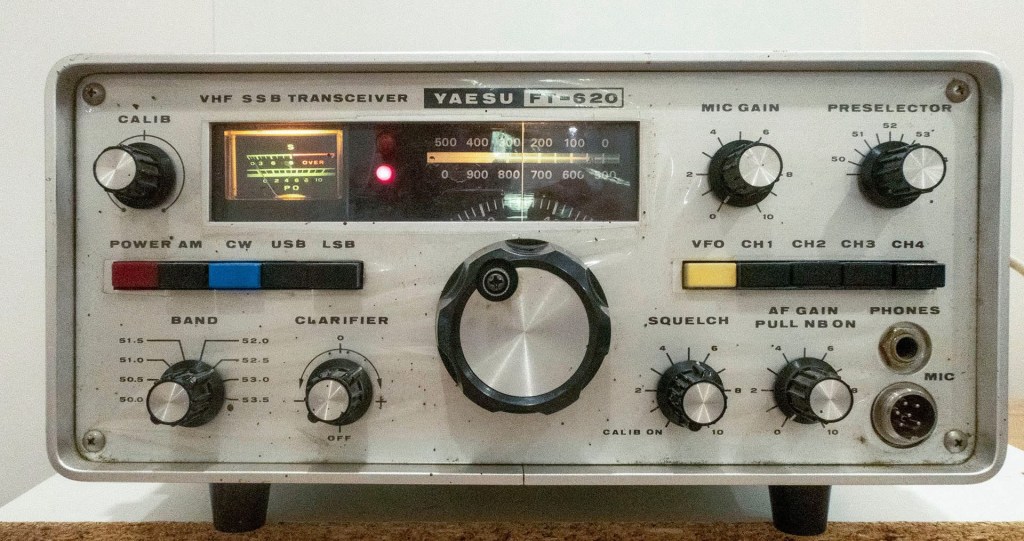
Yaesu FT-620

The Yaesu FT-620 (and its updated version, the FT-620B) is a vintage amateur radio transceiver designed specifically for the 6-meter band (50–54 MHz). Produced in the 1970s, it offers support for AM, CW, and SSB (USB/LSB) modes, making it a versatile rig for its time, especially during the era when 6 meters was gaining popularity for both local and DX communications. It was part of Yaesu’s early generation of VHF monoband rigs, built with a solid metal chassis and analog controls, reflecting the rugged, durable engineering of the period.

In terms of performance, the FT-620 delivers approximately 20 watts PEP on SSB and CW, and around 4–8 watts on AM. Receiver sensitivity is quite good for a rig of its era, typically around 0.5 µV for 10 dB S/N in SSB/CW modes. The transceiver divides the 6-meter band into multiple segments using a bandswitch, and offers decent selectivity for SSB and CW operation. It can be powered from AC mains or 12–14 VDC, providing some flexibility for mobile or backup use. However, it lacks FM capability, which limits its use with modern 6m FM repeaters or simplex FM operations.

While the FT-620 is highly regarded for its build quality and straightforward analog operation, it does show its age. There’s no digital display, DSP, or modern filtering, and some units may require refurbishment—such as replacing aging capacitors or realigning circuits for optimal performance. Its bulk and weight (~8 kg) also make it less convenient for portable use. Nonetheless, for those interested in classic radios or operating 6 meters on SSB/CW, it remains a capable and enjoyable rig, particularly when paired with a good antenna.

Overall, the FT-620 is best suited to enthusiasts who appreciate vintage gear and are willing to maintain it. It still holds practical value today in the right hands—especially for those focused on SSB or CW operation during band openings. While it won’t compete with modern rigs in terms of features or integration, its simplicity, durability, and vintage charm continue to appeal to collectors and seasoned hams alike.

See my video below where I fire it up and give it a test.

See me fire up this old girl

More interesting reads

If you enjoyed this read, here are some more I think you will like.

Anytone 778UV Key Assignment

Key Assignment

For some reason, not all the key assignment options are in the manual and after a bit of searching, I found no complete list.  Hopefully this below helps you in selecting your Key Assignments on the main unit P1-P6 keys, as well as on the microphone PA-PD keys. I have listed them in alphabetical order however under it I have how I have my radio set up.

SelectionDescription
A/BSwitch Main Display from A or B
BNDBandwidth (adjust for low signals)
CALCalibration (non-functional)
CDTCTCSS / DCS options
DIRDirection of display
MONDisables squelch
NULLWill make button do nothing.
POWPower Level, Low Med Hi
RDWDual Watch
REVReverse transmit offset and frequency
SCNScan, channels or frequencies
SFTFrequency Offset
SQLSquelch
TALKTurns TX off for any particular channel
TRFBusy channel lockout
VOLVolume Level, press to change volume instead of channel
VOXVox toggle on or off
V/MSwitch from VFO to Memory Channel

Please let me know if I got any wrong or have missed one.

This is how I have set mine up, but as I use the radio, I will change this to suit my needs:

P1A/B
P2V/M
P3MON
P4SCN
P5SQL
P6VOL
P1 mode 2DIR
P2 mode 2SFT
P3 mode 2RDW
P4 mode 2POW
P5 mode 2CDT
P6 mode 2BND
PASCN
PBVOL
PCPOW
PDRDW

So what are your thoughts on this? How do you setup your radio? Please let me know via the comments below.

Here are some video’s you may enjoy also:


If you enjoyed this, here are some more reads you may enjoy:

  • Retevis RT73 – Kydera CDR300UV
    The Retevis RT73 and Kydera CDR300UV are identical radios. They are a DMR/FM duel band radio for Amateur radio use. This is great, as most of the early DMR radios available were commercial radios that…
  • Baofeng UV-17R Plus Series Review
    I recently got my hands on a new Baofeng UV-17R Plus Series radio. It didn’t take long at all to arrive and was not expensive at all. People these days pay more for a UHF…
  • DNR – Digital Noise Reduction
    As per the Yaesu FT-710 manual, the Digital Noise Reduction (DNR) system is designed to reduce the level of ambient noise found on the HF and 50 MHz bands. The (DNR) system is especially effective…
  • Portable HF all band Antenna and Mount
    I recently got the Radioddity M916 Heavy duty antenna magnetic mound with the Radioditty HF-008 all band portable antenna. I had always wanted to use HF more while camping or going on adventures around Australia…
  • Baofeng GT-5R Pro
    The first thing I noticed after receiving the radio was the size of the radio. It is small yet not to small that it is hard to use. It fits comfortably in your hand. Not…
  • Radioddity QT80
    The new QT80 radio by Radioddity is a fantastic radio and I have a lot of contacts on it already. QT60 Vs QT80 This is a QT80 model but there is also the QT60 model…
  • HF Mobile Antenna CBL-561
    CBL-561 Review The new CBL-561 antenna is strong and light that is fit for mobile work, camping or remote radio use. I plan to use this on our next outback trip! This antenna supports a…
  • Radioddity RA-UV712 Magnet Mount Antenna
    There are lots of duel band antennas available, but most required extra mounting brackets. These brackets often restrict you as to where you can mount the antenna on your car. One of my first mobile…
  • RH1 Radio Cup Holder
    Why does a radio need a cup holder? I agree it’s a bit odd. But this isn’t a product that involves a cup. Rather it uses a cup holder. Almost every car now has a…
  • Yaesu FT-225R
    The 2m band has always been an interesting one for me. It used to be swamped with pager interference, but it actually is a great band. Inversion allows your signal to travel long distances at…

HamClock

HamClock has always fascinated me, as it seems such an amazing program specifically set up for Amateur Radio. I have seen countless videos on it but the draw back was always needing to have a Raspberry Pi. While I am not afraid to get one, and learn how to use it, I just didn’t feel like taking the plunge into that world just yet. Though I think that world is about to come, and I will end up regretting not doing it sooner!

So, what is HamClock?

Glad you asked. According to their website (https://www.clearskyinstitute.com/ham/HamClock/) HamClock is a kiosk-style application that provides real time space weather, radio propagation models, operating events and other information particularly useful to the radio amateur.

It is designed to provide ham radio enthusiasts with real-time information about the sun’s position, ionospheric conditions, and DX cluster spots. HamClock is an open source application which is a tool for the shack providing live up to date information all on one screen. It was originally written by Elwood Downey WB0OEW.

HamClock displays a map showing the sun’s position, illumination (daylight/darkness), and the “grey line” (the transition between day and night). This information is crucial for understanding propagation conditions, as the grey line is often a prime time for DX (long-distance) communication.

Usually it needs to be installed on Quadra or lynix, but I have recently found out you can install it on Windows.

Installing HamClock on Windows

Guess what, this is possible, and may feel overwhelming at first, but after following the video below, I was able to do it in real time along with this video. I was shocked how easy it was and super surprised I had not done this earlier.

The instructions (a text file) are available via this link, and are referred to in the video. https://www.clearskyinstitute.com/ham/HamClock/hamclock-contrib/HamClock%20Windows10.txt So, have the instructions open while you watch the video. Please note, this is not my video and you should do this at your own risk – however it worked for me easily!

Before doing the video, I suggest you read all the points below it as there were a couple of things I changed.

The video starts with music, but just do what it says. Then the author will talk you through the steps after the initial install.

The bit I got stuck on was setting up Cluster in HamClock. This is about 12:50 into the video, perhaps it was because I had an updated version of HamClock since the above video was done. So, instead, I put in the following settings:

Setting Up HamClock

There are countless ways to set up HamClock. As a starting point, I stuck with the video above as he shows you how to from 13:30. Below is a link to that point in the above video.

This video below is from a friend who also shows you in great detail how to set up your HamClock to get the most of it. Some things are slightly different, but after seeing this, you can have an informed choice.

I found this video below very good also, as it goes into detail regarding the map in HamClock. As you will see it is done by the same person. He talks about the maps and how to customise it easily.

After a Windows Reboot

When you next do a windows reboot, you will need to restart HamClock. To do this, open a CMD window by typing CMD in the windows search menu.

Then type in :

wsl sudo hamclock &

and put in your password you made for lynx and you should be able to open it again. Make sure you do n ot close the comand screen until you are finished.

Summary

Below is what my HamClock looks like. I like the background “terrain” map as well as the night and day showing on the map. I would value your thoughts though, as I know I am about the last one to finally get onto HamClock.

With all of these tools, we should remember propagation shown is using data, but the rest of it is predictions based on knowledge.

If these propagation tools show there isn’t anything happening, always give it a try anyway. You never know without trying. You may be higher than other stations, or put out more power. You might just get an opening before other stations.

All the propagation websites are a summary of conditions recorded and sent in. HamClock is a good tool, it looks good, and gives you a lot of information on the one screen. You can adjust it easily also.

Please tell me your thoughts, and what you think. Do you use it? Perhaps you use it differently and have some advice for me and other readers. Hope you enjoyed the read.


Other Reads

If you enjoyed this read, here are some other ones you may be interested in. Please remember to subscribe and comment if this is helpful.

  • USB Device Error PL2303HXA
    I went into the device manager and found the error, my cable no longer worked. This same issue happened to a USB Card reader also.…
  • ProScan and ProScan Client
    I recently started using ProScan after years of using FreeScan. I have always enjoyed using FreeScan as it is easy to setup, I can download outputs from the software, and the main reason “it works”. However ProScan seems to be more graphical and has different features also.…
  • ProScan and ProScan Client Update
    I recently started using ProScan after years of using FreeScan. I have always enjoyed using FreeScan as it is easy to setup, I can download outputs from the software, and the main reason “it works”. However ProScan seems to be more graphical and has different features also.…
  • Iphone won’t download photos
    I get the “Device is unreachable” Error message when trying to import media from iPhone to Windows 10 PC. …
  • BlueDV Windows 10 GD-77
    I found it hard to find useful information on how to run the OpenGD-77 hotpot mode with Windows 10. At the time of writing this, there is a lot about this topic using a pistar and even android or ISO, but not much with Windows 10. This is my experence with BlueDV and Open GD-77 using a Windows 10 PC.…
  • Software Defined Radio (SDR)
    If you don’t have one of the latest and greatest expensive scanners, you will struggle to listen to a lot of transmissions. While there is still a lot of Analogue transmissions today, even a lot still on AM especially when it comes to Aviation, however most have gone…
  • Treehouse
    An unusual name, but a catchy name no less, just like Peanut that was written by the same person, David PA7LIM. If you like Peanut, then you will like this project also. This project, like Peanut, includes some amazing coding and thinking.…
  • Welle.io
    Welle.io is a DAB and DAB+ software defined radio (SDR). It runs on Windows, Linux and embedded devices like the Raspberry Pi 2 and 3. You can find the program and where to download it from their website. Using the Software With all these things, the software is…
  • DudeStar
    Here is a free windows program that will connect your PC to: DMR Yaesu Fusion DStar M17 P25 NXDN You can do all this without needing to purchase a radio. I prefer to use a radio, however I thought I would put this review together to help others…
  • GD-77 Won’t connect to PC
    I have been using my Radioddity now for some years and love it.  Though upgrading this to the OpenGD77 opened a whole new world and it gets better all the time. One issue I had for a period was not being able to connect to it via my…
  • NetTime
    When using digital over the radio, it is particularly important you have the correct time. Even a second out will stop you from making contacts. I relied on Windows to update the time and got an email from a helpful amateur telling me my time was out. You…
  • EchoLink CQ
    I’ve been using EchoLink well before smartphones where the only way I knew how to connect to a different station was via the radio. The internet wasn’t as extensive as it is now and you had to dial the node you wanted via the radio. You can still…
  • VARA – VARAC
    Ever heard this sound on HF / VHF / UHF? I know I have more and more recently. After a bit of research, someone told me it was VARAC. https://www.varac-hamradio.com/ As I understand it, the project started with Irad Deutsch 4Z1AC. It is free of charge for amateur…
  • Flrig
    Flrig is a transceiver control program designed to be used either stand alone or as an adjunct to fldigi (see my review on this). The supported transceivers all have some degree of CAT. The flrig user interface changes to accommodate the degree of CAT support available for the…
  • NanoVNA H4 USB Control to PC
    If you haven’t seen my previous blog on the NanoVNA Analyser, then I suggest you look at that first before reading this blog. This one will talk about how to connect your NanoVNA to your PC via the USB cable, so I am assuming you know the basics…