Yes, this popular girl name is actually an Amateur Radio term.
Christian, DK8EW, put me onto Olivia after we chatted on VARA HF. I had heard about Olivia before, but he encouraged me to give it ago.
Soon I made contact with VK4XP and must say it is a great digital format, though I understand a lot feel voice to voice is better (as I do). That said, this digital mode doesn’t require as much bandwidth, so has the potential to go further. The typical Olivia signal can still be decoded when the amplitude of the noise is over ten times that of the Olivia signal which is amazing.
Olivia is part of the family of MFSK modes and has a high redundancy Forward Error Correction system similar to MT63. The MFSK family is very large with many modes, so it can make it very difficult to work out which is which when you hear it. Olivia works really well on poor HF paths.
Olivia digital modes are commonly referred to by the number of tones and the bandwidth, in Hertz, used. Therefore, it is common to express the Olivia digital mode as Olivia X/Y (or Olivia Y/X ), where X refers to the number of different audio tones transmitted and Y refers to the bandwidth in hertz over which these signals are spread. Examples of common Olivia modes are 8/250 (meaning, 8 tones/250-Hertz bandwidth), 16/500, and, 32/1000. There are three popular Olivia modes, which is 8-FSK, 16-FSK and 32-FSK, that have three, four or five bits per symbol.
Olivia QSO Formats
Format Bandwidth / Tones
Audio Centre Marker (Hz)
Baud
Decode S/N Radio (dB)
Speed WPM
500/16*
750
31.25
-13
19.5
1000/32*
1000
31.25
-12
24.4
500/8
750
62.5
-11
29.3
1000/16
1000
62.5
-10
39.1
500/4
750
125
-10
39.1
250/8
625
31.25
-14
14.6
* Is the most common Olivia format in use currently
Here is a video that will give you more information:
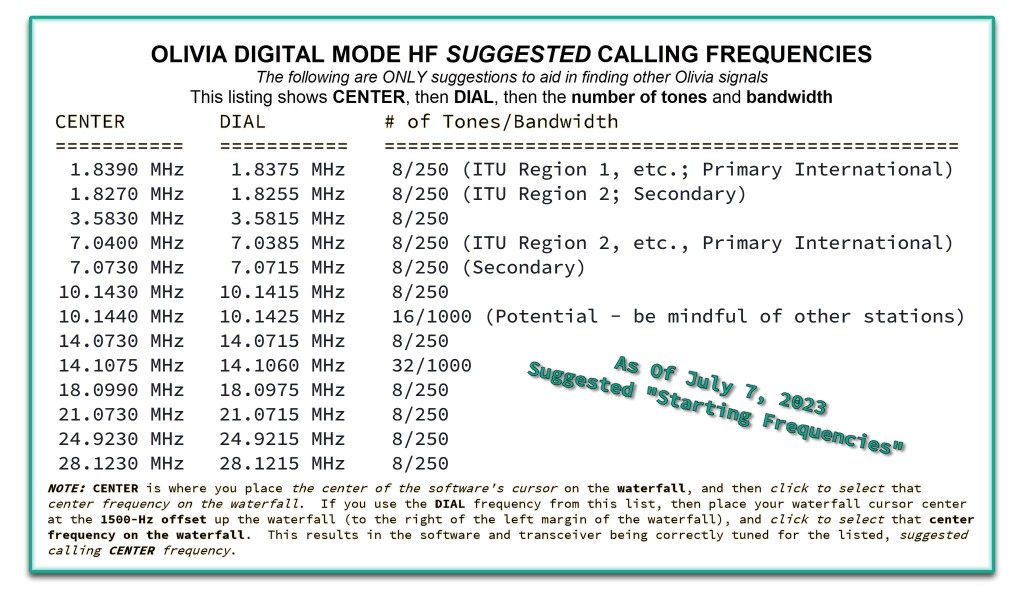
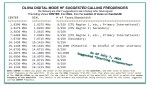
While Olivia could acutally be used anywhere in the data allocated area on HF, however you may not find anyone if you are not on the right frequency. Below is the suggested calling frequencies used around the world:
I’ve typed to many people around the world on this mode and surprised how well it works when conditions are not great. The software tells you if there is another conversation on the band also which is handy.
There are a few protocols, like using BTU (back to you) on your last line and some shortcut typing which isn’t the same as the youth of today use in text messages!
While I still prefer voice contacts with people, at least this option is a conversation and something different when conditions are not favourable.
What are your thoughts on this mode? Have you tried it? Have you had success? What radio and band did you try?
If you enjoyed that, here are some other interesting reads:
When using digital over the radio, it is particularly important you have the correct time. Even a second out will stop you from making contacts. I relied on…
I purchased the Diamond W series W8010 antenna and quickly put it together. The instructions were a bit hard to read as it was exceedingly small. However, I…
The Nano VNA-H 4 is my new toy that has just arrived after purchasing via Banggood. This Antenna Analyser is a complicated device, but doesn’t have to be,…
DXHeat.com is a great website that can update you the current conditions on each band. The website has filtering of incoming DX Spots which can be displayed instantly…
The S-meter is an instrument on most radio receivers that measures the strength of the signal being received. It uses a unit: the S-point. HF radios usually have…
I recently got the Radioddity M916 Heavy duty antenna magnetic mound with the Radioditty HF-008 all band portable antenna. I had always wanted to use HF more while…
The Yaesu FT-620 (and its updated version, the FT-620B) is a vintage amateur radio transceiver designed specifically for the 6-meter band (50–54 MHz). Produced in the 1970s, it offers support for AM, CW, and SSB (USB/LSB) modes, making it a versatile rig for its time, especially during the era when 6 meters was gaining popularity for both local and DX communications. It was part of Yaesu’s early generation of VHF monoband rigs, built with a solid metal chassis and analog controls, reflecting the rugged, durable engineering of the period.
In terms of performance, the FT-620 delivers approximately 20 watts PEP on SSB and CW, and around 4–8 watts on AM. Receiver sensitivity is quite good for a rig of its era, typically around 0.5 µV for 10 dB S/N in SSB/CW modes. The transceiver divides the 6-meter band into multiple segments using a bandswitch, and offers decent selectivity for SSB and CW operation. It can be powered from AC mains or 12–14 VDC, providing some flexibility for mobile or backup use. However, it lacks FM capability, which limits its use with modern 6m FM repeaters or simplex FM operations.
While the FT-620 is highly regarded for its build quality and straightforward analog operation, it does show its age. There’s no digital display, DSP, or modern filtering, and some units may require refurbishment—such as replacing aging capacitors or realigning circuits for optimal performance. Its bulk and weight (~8 kg) also make it less convenient for portable use. Nonetheless, for those interested in classic radios or operating 6 meters on SSB/CW, it remains a capable and enjoyable rig, particularly when paired with a good antenna.
Overall, the FT-620 is best suited to enthusiasts who appreciate vintage gear and are willing to maintain it. It still holds practical value today in the right hands—especially for those focused on SSB or CW operation during band openings. While it won’t compete with modern rigs in terms of features or integration, its simplicity, durability, and vintage charm continue to appeal to collectors and seasoned hams alike.
See my video below where I fire it up and give it a test.
See me fire up this old girl
More interesting reads
If you enjoyed this read, here are some more I think you will like.
Maximum Usable Frequency (MUF) is an important concept in HF radio propagation and amateur radio communications. It refers to the highest frequency that can be used…
World Amateur Radio Day is celebrated every year on April 18, marking the founding of the International Amateur Radio Union (IARU) in 1925. The organisation was…
Amateur Radio Television (ATV), often called “ham TV,” is a niche part of amateur television where licensed radio operators transmit live video and audio over radio…
The Baofeng UV-5R Mini handheld radio is a popular and affordable dual-band amateur radio transceiver widely used by beginners and experienced ham radio operators. Designed as…
HF radio and lightning storms are closely connected because lightning creates strong radio frequency interference that affects HF radio communication (3–30 MHz). High Frequency radio is…
OpenHamClock is an open-source amateur radio dashboard designed as a modern successor to the original HamClock used by radio amateurs worldwide. It provides a real-time visual…
The Radtel P8 PoC radio is a Push-to-Talk over Cellular (PoC) device that looks like a traditional walkie-talkie but communicates using 4G/LTE mobile networks instead of…
An antenna coupler (also called an antenna tuner or matching network) is a device used in radio systems to ensure impedance matching between a transmitter and…
Amateur radio operators use many different antenna types, each designed for specific bands, space limits, and operating goals. Here’s a clear overview of the most common…
Interference in Amateur Radio refers to unwanted signals that disrupt radio communication. This interference can reduce signal clarity, make contacts difficult, or completely block communication between…
As licensed Amateur Radio operators, we have all heard about Yaesu. We have all seen a Yaesu radio and most of us have used and even own one.
I’ve had and have several Yaesu radios. From extremely old ones full of valves and extremely heavy. One can only assume they were transported to where we live by sea and not air given their weight.
But what do you know about the company Yaesu? We can assume it is or was a Japanese company, but I just felt there might be something interesting about the history of this company. Let me show you what I found after some research.
Let’s go to the beginning
Prior to 1959 Sako Hasegawa had been operating a company called General Television Co Ltd in Ota-ku, Tokyo since 1956. His first SSB Equipment had been manufactured under the General Television Co Ltd name in 1957. Sako Hasegawa’s ambition seems to have been to design and manufacture modern HF single sideband equipment for the amateur radio market.
Yaesu is a Japanese brand of amateur radio equipment, founded as Yaesu Musen Co. Ltd. in 1959 by a Japanese radio amateur Sako Hasegawa call sign JA1MP. He lived in Yaesu, Japan, a district of Tokyo.
Yaesu Musen Co’s first product was a crystal controlled monoband 40 metre transmitter, the FL-10/40. The second radio was released soon after the first which was a 5 band crystal controlled mechanical filter HF transmitter called the FL-20.
Yaesu had initially been formed with the intention to develop and manufacture commercial and amateur radio transceivers just for the Japanese market, but only five years after its formation, the company had signed foreign sales agreements for export to Australia and Germany.
Bail Radio & TV Service sold the FL-100B direct throughout Australia from their premises in the Melbourne, Victoria, suburb of Box Hill.
1963 and the Swiss
In Europe, the equipment was sold under the Yaesu brand and the Sommerkamp brand. In 1963, four years after the company started, the Swiss firm Sommerkamp imported Yaesu equipment and sold it using their own brand.
1965 and the Americans
In 1965, Yaesu’s equipment was first imported into America by Spectronics, Inc. located in Signal Hill, California. Today most companies try to import into America first, but that isn’t Yaesu’s story.
Yaesu became an important presence in the American amateur radio market with the introduction and improvement of its very popular FT-101 in the 1970s.
FT-101
The FL-100 was a crystal controlled 5 band HF transmitter but with an SSB power input of 100 watts PEP.
Sako Hasegawa death
Sako Hasegawa, who founded the company, died in 1993. Following his death, Jun Hasegawa took over as managing director.
1998 Vertex Standard
Yaesu Musen acquired the STANDARD radio equipment brand from Marantz Japan in 1998 and changed the company name to Vertex Standard Co. Ltd.
2007 Motorola
Vertex Standard didn’t last long by itself. In 2007, Motorola announced its intention to purchase 80% of Vertex Standard and form a joint venture with Tokogiken (a privately held Japanese company controlled by Jun Hasegawa), which would hold the other 20%. This deal was completed in January 2008. The joint venture was dissolved effective January 1, 2012.
The Vertex Standard land mobile division operates as a wholly-owned subsidiary headquartered in Tokyo, Japan. The Amateur Radio, Airband and Marine Radio business was transferred to the new company “Yaesu Musen”.
Taken from Motorola’s website, Motorola Solutions combined the best of Vertex Standard’s portfolio with our industry-leading two-way radio lineup.
2000’s Minimal – Shift – Keying
In the early 2000s, minimum-shift keying (GMSK) technology emerged in amateur radio. It was the dominant digital mode.
2013 – Digital Mode “Fusion”
In 2013, YAESU launched its own digital mode of operation for amateur radio known as: “System Fusion”. Or known as Fusion.
Like most other digital modes, Fusion utilises a narrower radio bandwidth. However, with System Fusion, Yaesu gave it special attention to compatibility with analog FM radio. Their intended goal was to simplify migration of the existing amateur radio repeaters from analog to digital.
Yaesu is the only company with System Fusion-enabled devices.
C4FM
C4FM, or Continuous Four-Level Frequency Modulation, is a digital communication mode used in amateur radio, particularly by Yaesu and System Fusion radios. It is a type of 4FSK (Four-Frequency Shift Keying) that, when combined with FDMA (Frequency Division Multiple Access), allows for digital voice and data transmission.
C4FM offers features like digital voice with clear audio, data transmission, and internet connectivity through WIRES-X nodes, enabling features like real-time navigation and text messaging.
The System Fusion communication protocol enables devices to analyze an incoming signal and automatically determine if it is using C4FM or conventional FM mode. System Fusion also enables data transfer at full rate with speeds reaching up to 9,600 bits per second.
Other Popular Digital Modes
ICOM developed devices using the D-STAR protocol. Other brands use DMR, among other modes. The list goes on and on.
My thoughts on Yaesu
For what it’s worth, I’ve always been happy with Yaesu products. I have several radios with their name on it and have never had a problem with them.
Yaesu Musen, is still a Japanese company. It is a well-known manufacturer of amateur, marine, and commercial radio equipment. Yaesu is well recognised for its amateur radio equipment.
So tell me, what are your thoughts on Yaesu? What products do you have of theirs? Do you like their products? Do you prefer something else? Perhaps you liked their earlier products compared to their current stock? Please share your thoughts in the comments below so others can see.
Yaesu did not play any part in this post. It is just information I found out about the company.
If you enjoyed that read, please subscribe and like. You may enjoy some of my other posts below.
Maximum Usable Frequency (MUF) is an important concept in HF radio propagation and amateur radio communications. It refers to the highest frequency that can be used for reliable communication between…
World Amateur Radio Day is celebrated every year on April 18, marking the founding of the International Amateur Radio Union (IARU) in 1925. The organisation was established in Paris when…
Amateur Radio Television (ATV), often called “ham TV,” is a niche part of amateur television where licensed radio operators transmit live video and audio over radio frequencies instead of traditional…
The Baofeng UV-5R Mini handheld radio is a popular and affordable dual-band amateur radio transceiver widely used by beginners and experienced ham radio operators. Designed as a compact version of…
HF radio and lightning storms are closely connected because lightning creates strong radio frequency interference that affects HF radio communication (3–30 MHz). High Frequency radio is commonly used for amateur…
OpenHamClock is an open-source amateur radio dashboard designed as a modern successor to the original HamClock used by radio amateurs worldwide. It provides a real-time visual display of essential ham…
The Radtel P8 PoC radio is a Push-to-Talk over Cellular (PoC) device that looks like a traditional walkie-talkie but communicates using 4G/LTE mobile networks instead of UHF/VHF radio frequencies. This…
An antenna coupler (also called an antenna tuner or matching network) is a device used in radio systems to ensure impedance matching between a transmitter and an antenna. Most transmitters…
Amateur radio operators use many different antenna types, each designed for specific bands, space limits, and operating goals. Here’s a clear overview of the most common ones and why hams…
A dipole antenna is a basic radio antenna made of two conductive elements fed at the center. It is typically a half-wavelength long and is widely used as a reference…
Interference in Amateur Radio refers to unwanted signals that disrupt radio communication. This interference can reduce signal clarity, make contacts difficult, or completely block communication between amateur radio operators. Radio…
I’ve heard a lot about dipole antennas, and I’ve heard a lot about long wire antennas also. I would say I’ve seen more dipoles than long wire antennas. So why…
The Yaesu FT-620 (and its updated version, the FT-620B) is a vintage amateur radio transceiver designed specifically for the 6-meter band (50–54 MHz). Produced in the 1970s, it…
Overview The Anytone AT-778UV is a dual-band VHF/UHF mobile transceiver designed for amateur radio operators. It operates on the 136–174 MHz (VHF) and…
The Baofeng UV-5R Mini handheld radio is a popular and affordable dual-band amateur radio transceiver widely used by beginners and experienced ham radio…
Have you heard of a flowerpot antenna? I hadn’t until recently, and I enjoy gardening also. But this antenna has nothing to do with gardening apart from why it was named flowerpot and it will probably end up either on your roof or garden.
A good friend of mine put me onto it as I was having trouble on 6m. A small group of us think 6m is under-utilised so we all get on their and chat for a while either on AM or SSB.
My antenna worked reasonably well, but they suggested I build my own using the flowerpot method. Given I’m always up for learning something new, I couldn’t resist.
The best but about the antenna is it is extremely cheap to make, easy to put together and the antenna works really well.
You can make a flowerpot antenna for either 6m, 2m or 70cm. You can hang it in a tree if you wish, in a pvc pipe like I did, or using a pole or something else.
There were only two parts I needed, everything else I already had. But if I had bought everything, it would have cost me I total about $15. Not bad for a great antenna and one you can say you built yourself.
All I needed to buy was the pvc pole, which is optional and a slightly wider pipe to make the coil on I already had the RG58 coax, and it even had a pl259 plug on it!
My flowerpot antenna
Items I purchased included: PVC Pipe. Make sure you give it a shake in the store before buying. If it is too flexible then it may bend and snap in the wind. But you don’t want it to heavy either.
Maximum Usable Frequency (MUF) is an important concept in HF radio propagation and amateur radio communications. It refers to the highest frequency that can be used for reliable…
World Amateur Radio Day is celebrated every year on April 18, marking the founding of the International Amateur Radio Union (IARU) in 1925. The organisation was established in…
Amateur Radio Television (ATV), often called “ham TV,” is a niche part of amateur television where licensed radio operators transmit live video and audio over radio frequencies instead…
The Baofeng UV-5R Mini handheld radio is a popular and affordable dual-band amateur radio transceiver widely used by beginners and experienced ham radio operators. Designed as a compact…
HF radio and lightning storms are closely connected because lightning creates strong radio frequency interference that affects HF radio communication (3–30 MHz). High Frequency radio is commonly used…
OpenHamClock is an open-source amateur radio dashboard designed as a modern successor to the original HamClock used by radio amateurs worldwide. It provides a real-time visual display of…
The Radtel P8 PoC radio is a Push-to-Talk over Cellular (PoC) device that looks like a traditional walkie-talkie but communicates using 4G/LTE mobile networks instead of UHF/VHF radio…
An antenna coupler (also called an antenna tuner or matching network) is a device used in radio systems to ensure impedance matching between a transmitter and an antenna.…
Amateur radio operators use many different antenna types, each designed for specific bands, space limits, and operating goals. Here’s a clear overview of the most common ones and…
A dipole antenna is a basic radio antenna made of two conductive elements fed at the center. It is typically a half-wavelength long and is widely used as…
Interference in Amateur Radio refers to unwanted signals that disrupt radio communication. This interference can reduce signal clarity, make contacts difficult, or completely block communication between amateur radio…
I’ve heard a lot about dipole antennas, and I’ve heard a lot about long wire antennas also. I would say I’ve seen more dipoles than long wire antennas.…
Repeater-START is a multi-platform app designed for ham radio and radio-operator enthusiasts who need fast access to repeater information. The app provides a detailed repeater map as well…
What Is the 6m Band? The 6-meter band, spanning roughly 50–54 MHz, is a section of the VHF spectrum assigned to amateur radio operators. Its wavelength is six…
Overview The Anytone AT-778UV is a dual-band VHF/UHF mobile transceiver designed for amateur radio operators. It operates on the 136–174 MHz (VHF) and 400–490 MHz (UHF) bands, offering…
Yes, this popular girl name is actually an Amateur Radio term. Christian, DK8EW, put me onto Olivia after we chatted on VARA HF. I had heard about Olivia…
The Yaesu FT-620 (and its updated version, the FT-620B) is a vintage amateur radio transceiver designed specifically for the 6-meter band (50–54 MHz). Produced in the 1970s, it offers support for AM, CW, and…
Key Assignment For some reason, not all the key assignment options are in the manual and after a bit of searching, I found no complete list. Hopefully this…
Everyone that has been into radio for a while will know the brand Kenwood. And most know Kenwood isn’t only into Amateur radio, they are bigger than that,…
HamClock has always fascinated me, as it seems such an amazing program specifically set up for Amateur Radio. I have seen countless videos on it but the draw…
You could say every amateur radio operator knows about the Baofeng if they have been around long enough. Most have held one of their radios and lots have…
I’ve always wanted to take the radio with me while on holidays and I always do. However I’ve always been limited to 2m and 70cm including local repeaters and digital work.
Our family enjoy holidays all over Australia into some of the most remote places without water, power or any mobile signal. Sometimes this can last week’s at a time.
If your keen to learn more about our travels around Australia and learn more, please let me know.
Most of these remote locations means limited activity on 2m or 70cm as there are no repeaters for days!
Because of this remoteness, there are several outback radio networks we can join or listen to. They make quite interesting listening.
However, when on holidays, we amateurs don’t want to just listen, we want to be part of the action! And HF is the next best thing.
I’m currently on holiday in the Victorian high country, also known as “The Man from Snowy River” country. It is rugged, beautiful and high. So up here I can actually can receive several 2m and 70cm repeaters, but this is a good test for HF work.
High up on Mount Buffalo
With me, I brought a battery pack, that has a 12 volt lithium battery which we run our camping fridge off. I now run my HF gear off it!
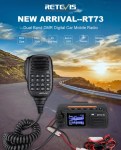
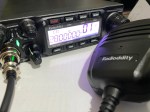
I also brought my new QT-80 radio, which is small in size yet puts out 80 watts. I have placed a video below on this radio if you are not familiar with it.
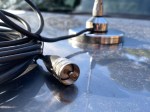
I used a magnet mount antenna base as the car I was using is not mine. This mount sticks to the car like glue, but also comes off on demand so you can adjust the antenna as required.
I brought two antennas to test. The first one was the HF-008 antenna that covers more bands than the QT80. I have a video on both these below for you if you are not familiar with it.
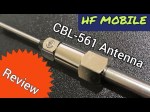
I also brought the new CBL-561 HF antenna so I could compare the two antennas. This antenna can be used while mobile unlike the HF-008 antenna. I have another video for you to show you that antenna below:
Before leaving home, I went to the hardware store and bought two lengths of pipe with caps that could safely store each antenna. I could then almost throw them in the boot of the car and not be worried about them being damaged or caught on something as I pulled them out of the boot.
Hot Tip
The funny thing was, while on holidays, I forgot to bring a measuring tape to adjust the antenna. Fortunately one of my children had a ruler with them so I was able to mark measurements down the side of the tube with a sharpie.
I also wrote down next to the measurements the lengths Radioddity recommended and then as I tuned in the antenna myself with the lowest SWR, I marked the pipe to my best measurements which were very close to the same as Radioddity.
This Tip I am sure will be very useful going forward when I’m out in the Australian outback or somewhere that I have no ruler!
Results
Both antennas fitted the same magnetic base which made this setup work well.
On testing both antennas using the same frequency to the same long distance contact, I and they couldn’t tell the difference between us. I found both antennas easy to tune in and get the SWA right down before making any contacts.
I then tried again from the top of Mount Buffalo, one of our highest mountains and got the same results where both myself and the contacts I spoke to didn’t know I had even changed the antenna.
There are differences between the antennas though which may help you decide which antenna is right for you.
Compare Antennas
HF-008
This antenna covers a lot of HF bands, as covered in the video above. However it cannot be used while mobile, mainly due to the jumper cable. It is a great antenna and can be used with a radio that puts out a lot more watts than the small QT-80 radio I used.
CBL-561
The CBL-561R antenna does not cover as many HF bands as the HF-008 does, but if you are using the bands it does cover, then this antenna might be good for you. One big advantage to this antenna is that it can be used while mobile, not just stationary.
Both antennas will need adjusting if you switch bands or switch from one end of the band to another. So setting the antenna to a permanent mount on the car on the top of the roof where it ends up out of reach, then you may want to rethink this. I found the magnet mount ideal, as you can still have it on the highest point of the car and access it easily.
Another option I also use is a bull bar mount that I use on my 4×4.
I’d encourage you to watch my video below as it explains what I discovered.
Remember the old saying Hight is Might and going portable gives you an opportunity to test this theory.
Hope you enjoyed this read. Below are some other interesting articles I have also written that you may enjoy.
HF radio and lightning storms are closely connected because lightning creates strong radio frequency interference that affects HF radio communication (3–30 MHz).…
Amateur radio operators use many different antenna types, each designed for specific bands, space limits, and operating goals. Here’s a clear overview…
Interference in Amateur Radio refers to unwanted signals that disrupt radio communication. This interference can reduce signal clarity, make contacts difficult, or…
Repeater-START is a multi-platform app designed for ham radio and radio-operator enthusiasts who need fast access to repeater information. The app provides…
The Yaesu FT-620 (and its updated version, the FT-620B) is a vintage amateur radio transceiver designed specifically for the 6-meter band (50–54 MHz). Produced in the 1970s,…
With so many different HF antennas available, I often wondered what people in high rise buildings did. If they can not put an antenna on the roof, what options are left for them? I talk to so many people from Asian cities who would have this problem, and occasionally I see what they do.
The easiest option is to stay on digital like DMR. These only require internet, and a hand held radio, but this always asks the question, is this real amateur radio? My opinion is if it connects people that are licenced and only licenced people can uses it, then I guess it is, while understanding it may not be everyone’s cuppa. I do understand there are many even in Australia in retirement villages who only have the option of digital radio due to restrictions on antennas.
Today, I made contact with Lok Shui Fan VR2VAZ in Hong Kong, and on his QRZ page, he came up with an amazing idea that clearly works for him. While it is not going to be the best antenna ever seen, it is perhaps the best antenna he is able to use. Given we are about 7450 km (4627 miles) apart, and still made contact on this antenna, you can’t say it doesn’t work.
On his QRZ page, Lok says “This is my DIY HF Fish Pole Antenna. Can be used under 80M,40M,30M, 20M, 17M, 15M, 12M, 10M band.”
He also says “If I am not playing radio, all the antenna will be hidden in flower bed”.
There are more photo’s on his QRZ page. He even has a youtube video on it.
I guess it would feel like catching contacts everytime you made a contact. If you enjoyed fishing and radio, this might be a bit of fun for you?
I think it is a fantastic idea. What do you think? Have you built your own antenna that camouflage’s when not in use?
If you enjoyed this read, here are some other reads you may enjoy also:
If you want to get onto Digital Radio for less (way less) than $100, then you may be interested in this. I have Apple equipment, and therefore miss out on a lot of the testing apps that are only available…
Orion is an app that isn’t really known in my world, perhaps because it isn’t available on all platforms, or because it does transmit your exact location to everyone on the channel. However there are some benefits to this mode…
The WizNet DMR app is still in beta testing, and at the time of writing this, you have to not only have a currently have a licence as an Amateur Radio Operator, but approved to be part of the beta…
How do you stop a hand held radio from falling and being damaged? Do you sometimes put the radio down on a bench or desk between overs or while you are waiting for someone to call you? Some radio’s don’t…
A good friend of mine, Mike VK5ZC, put the information below together and asked me to put it on my web site. He has spent a lot of time putting it together with pictures and videos, so I encourage you to have a good read.…
A good friend of mine, Mike VK5ZC, put the information below together and asked me to put it on my web site. He has spent a lot of time putting it together with pictures and videos, so I encourage you to have a good read.…
There are several DMR networks around the world, and more and more start all the time. The Australian DMR network currently covers the entire country and is for Australian residents only. It can often be hard to find which DMR…
I found it hard to find useful information on how to run the OpenGD-77 hotpot mode with Windows 10. At the time of writing this, there is a lot about this topic using a pistar and even android or ISO, but not much with Windows 10. This is my experence with BlueDV and Open GD-77 using a Windows 10 PC.…
Have you ever tried Band Stacking before? This is where you have three options per band every time you go to that band. For example, you may have one set up on SSB, one on CW and another on Data, all on the same band. You can easily switch between them all.
For example, if you are on 20 metres, press band and 14 again, and if band stacking is on, it will keep you on 20 metres but to the different stack. This different stack could have a different mode. You usually have three per band.
Have a look at the video for more on how to use it and turn it on:
If you enjoyed that, below are some more interesting reads you may enjoy:
As per the Yaesu FT-710 manual, the Digital Noise Reduction (DNR) system is designed to reduce the level of ambient noise found on the HF and 50 MHz bands. The (DNR) system is especially effective during SSB operation. Any of 15 different noise-reduction algorithms can be selected; each of these algorithms was created to deal…
Have you ever tried Band Stacking before? This is where you have three options per band every time you go to that band. For example, you may have one set up on SSB, one on CW and another on Data, all on the same band. You can easily switch between them all. For example, if…
As licensed Amateur Radio operators, we have all heard about Yaesu. We have all seen a Yaesu radio and most of us have used and even own one. I’ve had and have several Yaesu radios. From extremely old ones full of valves and extremely heavy. One can only assume they were transported to where we…
On the 10-metre band, 28.490 is the unofficial calling frequency for Australia and New Zealand. This is interesting as the Band plans state it is 28.390 as the recommended intra-VK calling frequency.
That said, 28.490 is more recognised as the unofficial calling frequency down under.
Most amateurs down under will listen to 28.490 on ten metres and put out a call there, but then QSY to another frequency 10 or 20 kHz away either after making contact, or before contacting another station by announcing where you plan to go.
If you want to get onto Digital Radio for less (way less) than $100, then you may be interested in this. I have Apple equipment, and therefore miss out on a lot of the testing…
Orion is an app that isn’t really known in my world, perhaps because it isn’t available on all platforms, or because it does transmit your exact location to everyone on the channel. However there are…
The WizNet DMR app is still in beta testing, and at the time of writing this, you have to not only have a currently have a licence as an Amateur Radio Operator, but approved to…
How do you stop a hand held radio from falling and being damaged? Do you sometimes put the radio down on a bench or desk between overs or while you are waiting for someone to…
A good friend of mine, Mike VK5ZC, put the information below together and asked me to put it on my web site. He has spent a lot of time putting it together with pictures and videos, so I encourage you to have a good read.…
A good friend of mine, Mike VK5ZC, put the information below together and asked me to put it on my web site. He has spent a lot of time putting it together with pictures and videos, so I encourage you to have a good read.…
There are several DMR networks around the world, and more and more start all the time. The Australian DMR network currently covers the entire country and is for Australian residents only. It can often be…
I found it hard to find useful information on how to run the OpenGD-77 hotpot mode with Windows 10. At the time of writing this, there is a lot about this topic using a pistar and even android or ISO, but not much with Windows 10. This is my experence with BlueDV and Open GD-77 using a Windows 10 PC.…
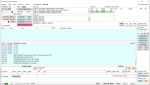
DXHeat.com is a great website that can update you the current conditions on each band. The website has filtering of incoming DX Spots which can be displayed instantly using great graphical tools.
From the main landing page dxheat.com you can do a search by call sign or open DX Cluster. You can also scroll down to see more information.
Callsign Search
By typing in a call sign, you will see a lot of information instantly about that person. Some of the graphs are interesting as it shows how often the selected user does DX Spots by date, by band and what Continent they have been heard in.
It then shows what DX spots this user as submitted by time, band, and Continent.
DX Cluster
This is the best part of the website.
In the middle you can see live data. You can apply filters as required on the left side. On the right is the current UTC time and a lot of other interesting things.
On the right is a Propagation box which is helpful.
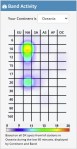
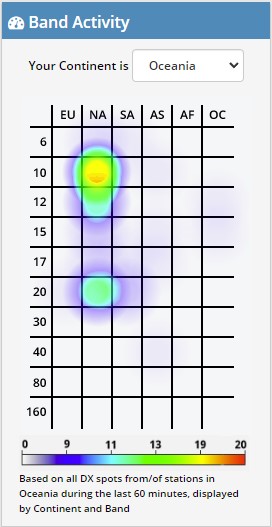
Also on the right is a Band Activity box which is great and perhaps the best part of the website.
This graph is powerful and shows you instantly where the bands are open.
Select your area via the drop-down box. I have selected Oceania in the example shown. You can see the band is open on 10 metres to NA, which is North America, and slightly open to NA on 20 metres also.
10 minutes before I took this screen dump, 10 metres was in the red to North America, so it changes live. 10 minutes after this screen dump, 20 metres was in the purple meaning conditions were getting harder, however 10 metres became a solid red.
20 minute later after the above screen dump, I took the following one on the right.
Now you can see 10 metres to North America is strong, and 20 metres is not even showing anymore. 15 metres is also on the graph now potentially growing in strength.
Asia is also starting to show signs of colour on 17 metres which it wasn’t before.
While these graphs are powerful, they are limited to the amount of activity on the band. For example, if no one picks up a microphone, then there is still no one to listen to.
It is a great starting point though and displayed very well. I would love to embed this on my QRZ page if anyone knows how.
The main text in the screen, you can hover over the green boxes and filter according to that box. Up towards the top, there is a mode section on the left side with green boxes, you can filter by them also. You can filter via region and band also.
Login
At the top of the screen is a login/sign up option. I would encourage you to create an account. Simply put in your email and password, then confirm it and you will be able to update your profile. You will then have an opportunity to adjust your display DX-Cluster settings as you like.
Other websites
There are other websites that show similar information in a different format that include:
Solar Flux on VK3FS https://3fs.net.au/daily-solar-data/ This page is well written by a fellow Amateur, Andrew, also living in VK3. He explains a lot and goes to a lot of detail. On this Daily Solar Data page there is a usful graph tha shows the Solar Flux over the last month.
Other interesting reads:
Did you enjoy this read, below are some other interesting topics you may enjoy also:
Maximum Usable Frequency (MUF) is an important concept in HF radio propagation and amateur radio communications. It refers to the highest frequency that can be used for reliable communication between…
World Amateur Radio Day is celebrated every year on April 18, marking the founding of the International Amateur Radio Union (IARU) in 1925. The organisation was established in Paris when…
Amateur Radio Television (ATV), often called “ham TV,” is a niche part of amateur television where licensed radio operators transmit live video and audio over radio frequencies instead of traditional…
The Baofeng UV-5R Mini handheld radio is a popular and affordable dual-band amateur radio transceiver widely used by beginners and experienced ham radio operators. Designed as a compact version of…
HF radio and lightning storms are closely connected because lightning creates strong radio frequency interference that affects HF radio communication (3–30 MHz). High Frequency radio is commonly used for amateur…
OpenHamClock is an open-source amateur radio dashboard designed as a modern successor to the original HamClock used by radio amateurs worldwide. It provides a real-time visual display of essential ham…
The Radtel P8 PoC radio is a Push-to-Talk over Cellular (PoC) device that looks like a traditional walkie-talkie but communicates using 4G/LTE mobile networks instead of UHF/VHF radio frequencies. This…
An antenna coupler (also called an antenna tuner or matching network) is a device used in radio systems to ensure impedance matching between a transmitter and an antenna. Most transmitters…
Amateur radio operators use many different antenna types, each designed for specific bands, space limits, and operating goals. Here’s a clear overview of the most common ones and why hams…
A dipole antenna is a basic radio antenna made of two conductive elements fed at the center. It is typically a half-wavelength long and is widely used as a reference…

 There are several website that tell you what bands are open in your area. Most people paste them on their QRZ page, but there are some examples below…
 When using digital over the radio, it is particularly important you have the correct time. Even a second out will stop you from making contacts. I relied on…
 I’ve heard several amateur radio operators say they are running a Barefoot setup. But what does it mean? It has nothing to do with what is or is…
 I purchased the Diamond W series W8010 antenna and quickly put it together. The instructions were a bit hard to read as it was exceedingly small. However, I…
 The Nano VNA-H 4 is my new toy that has just arrived after purchasing via Banggood. This Antenna Analyser is a complicated device, but doesn’t have to be,…
 DXHeat.com is a great website that can update you the current conditions on each band. The website has filtering of incoming DX Spots which can be displayed instantly…
 Ever heard this sound on HF / VHF / UHF? I know I have more and more recently. After a bit of research, someone told me it was…
 The S-meter is an instrument on most radio receivers that measures the strength of the signal being received. It uses a unit: the S-point. HF radios usually have…
 As per the Yaesu FT-710 manual, the Digital Noise Reduction (DNR) system is designed to reduce the level of ambient noise found on the HF and 50 MHz…
 I recently got the Radioddity M916 Heavy duty antenna magnetic mound with the Radioditty HF-008 all band portable antenna. I had always wanted to use HF more while…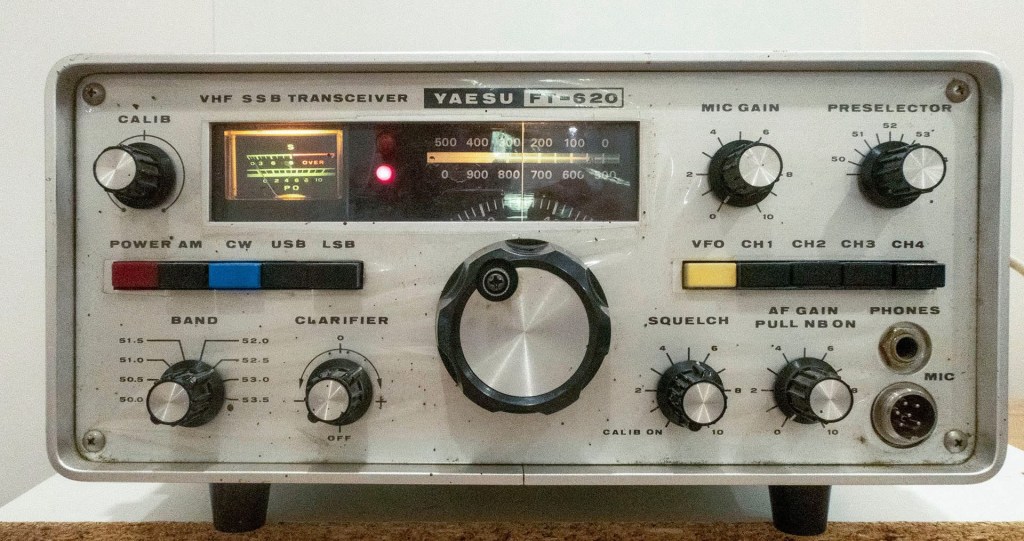













 VK3TBS