Repeater-START

Repeater-START is a multi-platform app designed for ham radio and radio-operator enthusiasts who need fast access to repeater information. The app provides a detailed repeater map as well as a distance-sorted list, allowing users to easily locate nearby communication points wherever they travel. Because it uses open repeater databases, the information remains current, community-supported, and reliable.

A major advantage of Repeater-START is its strong offline support. Once your repeater data is downloaded, the app continues to function without cellular or internet coverage. This makes it especially useful for operators travelling through remote regions, rural areas, or emergency-response zones where connectivity cannot be guaranteed.

The app also includes clear programming instructions for many popular radios, including handheld units from brands such as Baofeng, Yaesu, and Kenwood. This feature helps both new and experienced operators quickly configure their radios to work with specific repeaters, saving time and reducing setup errors.

Repeater-START offers optional visibility for GMRS repeaters in supported regions, making it valuable not just for amateur radio operators but also for general outdoor users, preparedness groups, and radio hobbyists. The Android and Linux versions are open-source, appealing to users who prefer transparent, community-driven software.

Overall, Repeater-START is a practical, lightweight tool built for ham radio operators, GMRS users, and anyone who depends on accurate, offline-ready repeater mapping and step-by-step radio programming guidance. It combines simplicity with flexibility, making it a strong companion for both everyday use and field operations.

iPhone app: https://apps.apple.com/au/app/repeaterstart-premium/id6738314675

This coupon code for the desktop premium: enter “VK3TBSDISCOUNT”, at https://hearham.com/dashboard checkout that will give you all 70% off a year.

More info is available at http://hearham.com/repeaters


If you enjoyed that read, below are some more:

  • Dipole Antennas Vs Long Wire Antennas
    I’ve heard a lot about dipole antennas, and I’ve heard a lot about long wire antennas also. I would say I’ve seen more dipoles than long wire antennas. So why is that? What is the difference between them? Which is better? If one is a clear winner,…
  • Repeater-START
    Repeater-START is a multi-platform app designed for ham radio and radio-operator enthusiasts who need fast access to repeater information. The app provides a detailed repeater map as well as a distance-sorted list, allowing users to easily locate nearby communication points wherever they travel. Because it uses open…
  • The 6-Meter Amateur Radio Band
    What Is the 6m Band? The 6-meter band, spanning roughly 50–54 MHz, is a section of the VHF spectrum assigned to amateur radio operators. Its wavelength is six meters, and its position between HF and VHF makes it behave like a mix of both services. Why It’s…
  • Anytone AT-778UV
    Overview The Anytone AT-778UV is a dual-band VHF/UHF mobile transceiver designed for amateur radio operators. It operates on the 136–174 MHz (VHF) and 400–490 MHz (UHF) bands, offering reliable two-way communication for both ham radio and commercial use (depending on firmware version). Power Output This transceiver provides…
  • 160 Meters Band
    160 meters band is known as the “Gentlemen’s band”. It is right next to the AM commercial band, known as medium wave. The 160-meter band is the radio frequencies between 1.8 and 2 MHz. For many decades it was the lowest radio frequency band allocated for use…

Parks & Peaks App

I’ve been using the Parks and Peaks app on iphone and ipad for a little while now and quite enjoyed it.  There don’t seem to be many iphone apps compared to android, so when there is one, I usually have a look.  This one caught my eye as it was not only free, but useful.

After using it for a while, I contacted the author of the app, Sue Southcott, VK5AYL where she was thrilled that I would do a review on this free app, and provided me with a bit more information about her and the app.

The current version is for iphone only at this stage, but I think there are plans to expand this.  It allows users to Spot, Alert and export in ADIF and or spreadsheet format.

The app also allows users to search for sites including parks, peaks and silos by site ID. Or you can search by partial site name or by using the inbuilt map.

Setting up the map and connecting site data by longitude/latitude co-ordinates has been Sue’s favourite part.  Sue said “I already had the experience of connecting data to mapping systems during my career.

The following awards are handled – WWFF, SOTA, HEMA, IOTA, KRMNPA, SANPCPA, SIOTA, SHIRES, ZLOTA & POTA. 

Parks & Peaks is an Australian website that collects data from Amateur Radio operators who get out of their shacks and operate their radios portable in parks or on peaks.  It also collects data from those who Spot them.

AU/NZ sites can be downloaded to the device for use when there is no network available.

It will also produce multiple logs for one activation, so if you are on a Summit in a WWFF Park with a Pota reference, you will get 3 logs, one for SOTA, one for WWFF and one for POTA.

There is also a quick way to log activators as I show in the video below.

About Sue VK5AYL….

Sue has had her Advanced Amateur licence for a very long time and it led to her decision to study IT back in the 80s. 

For over 30 years, she had a successful career as an IT Manager, Analyst/Programmer, TAFE Lecturer and even my own software business, contracting to many organisations.

Most of her work involved working on client/server applications for large businesses. 

In 2014, Sue decided to learn how to write an iOS app and along came Parks & Peaks, which gave me something to work on. After purchasing a Mac Pro Sue had to learn how to use it very quickly, along with the new Apple language. 

In 2015, Sue presented version 1 to the WIA AGM in SA.  Since then, Sue has released versions 2 and 3 and compared to version 1, they had many more features.  Sue told me she loved every minute of developing the app as it has been a massive challenge and allowed her to continue with my love of programming.

Why not have a look at my video on this app where you can see it in full operation:


If you enjoyed that read, please remember to like and subscribe so you get updates as they happen. Below are some more reads you may enjoy from this site:

Solar Data & Propagation

There are several website that tell you what bands are open in your area. Most people paste them on their QRZ page, but there are some examples below that update every hour.

You can see more on their webpage https://www.hamqsl.com/solar.html where all you have to do is paste the code and put on your website. There is a great option to donate also. There is a wealth of information on this website that you can spend hours on.

This data is updated every hour, which is fantastic.

But what if you are not in front of your PC and want to look it up. There is a handy little app I use called Solar Data and Propagation. It is a small app only 12.5Mb in size on the iPhone and it is free. It is also available on Android at only 6.75Mb, I will talk about further down.

Below is the app on an apple device.

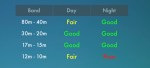
While it is only a little app, and doesn’t do a lot, it is a simple app that gives you what propagation is open at your current location. While other apps have heaps of features and functions that you may or may not use often, this little app has just what you would use often.

Above are the HF conditions, but you can also see VHF conditions and terrestrial. Adds do pop up from time to time, but the app is free so I don’t see this as a problem.

You can download it from the App Store.

Android

If you have an Android device, go to the store and search for HF Propagation. It should be the first one on the list with an orange sunshine as the logo.

Once installed, you have a lot of different options available on the first screen.

Scroll down, and you will see the HF then VHF conditions as mentioned for the Apple app.

Conclusion

This little information may save you from running out to the shack and turning everything on to find nothing or trying on the wrong band. As mentioned above, it can be on an apple or android device.

Hopefully, this makes it a little easier for you. Please put in the comments below what apps you enjoy using or let me know what you think.

Happy DX-ing, hopefully we talk on the air soon.

Some other posts that are similar

  • Repeater-START
    Repeater-START is a multi-platform app designed for ham radio and radio-operator enthusiasts who need fast access to repeater information. The app provides a detailed repeater map as well as a distance-sorted list, allowing users to easily locate nearby communication points wherever they travel. Because it uses open repeater databases, the information remains current, community-supported, and…
  • EchoLink CQ
    I’ve been using EchoLink well before smartphones where the only way I knew how to connect to a different station was via the radio. The internet wasn’t as extensive as it is now and you had to dial the node you wanted via the radio. You can still do this today but I don’t think…
  • Solar Data & Propagation
    There are several website that tell you what bands are open in your area. Most people paste them on their QRZ page, but there are some examples below that update every hour. You can see more on their webpage https://www.hamqsl.com/solar.html where all you have to do is paste the code and put on your website.…
  • HamAlert
    It has been a while since I have completed another update, but I have a lot in the making. A broken finger has kept me quiet! HamAlert is an app for both iPhone and Google devices that alerts you as to when a desired station appears on the DX cluster, the Beacon Network, SOTAwatch, POTA…
  • DROID-Star
    After talking to a friend just to the north of me, he told me about the app DROID-Star for Android. As I only have apple devices, this wasn’t initially an option for me, however I do have an Android TV box which I use for Amateur Radio, so will review it from that device. At…
  • WizNet DMR
    The WizNet DMR app is still in beta testing, and at the time of writing this, you have to not only have a currently have a licence as an Amateur Radio Operator, but approved to be part of the beta testing group. You can do this by googling the web site, submitt a few details,…
  • Orion Push to Talk
    Orion is an app that isn’t really known in my world, perhaps because it isn’t available on all platforms, or because it does transmit your exact location to everyone on the channel. However there are some benefits to this mode and does add another communication mode to your list. You can also create your own…

HamAlert

It has been a while since I have completed another update, but I have a lot in the making. A broken finger has kept me quiet!

HamAlert is an app for both iPhone and Google devices that alerts you as to when a desired station appears on the DX cluster, the Beacon Network, SOTAwatch, POTA or PSK Reporter. It saves you from checking them all manually.

You can receive different types of alerts including:

  • DXCC (both actual and callsign home DXCC)
  • Callsign
  • IOTA group reference
  • SOTA summit reference
  • WWFF/POTA division/reference
  • CQ zone
  • Continent
  • Band
  • Mode
  • Time and days of week
  • Source
  • Spotter callsign and DXCC

Just download the app from the App Store or google play, create an account, then set what alerts or triggers you want.

Press the three lines up the top left and select triggers. Then press plus to add one. The interface is mostly web based but works well within the app.

My first trigger was using my call sign under any conditions and alert via app

You can easily add more triggers. Select a condition and an Action on what you want the app to do when it meats the desired condition. You can also add in a comment to help you with each trigger.

Once you are done, simply press Done down the bottom of the screen.

Limitations

Limitations menu limits how many times you will be triggered. For example you may want to set a trigger to only alert you once an hour or day.

More information is available on their website at https://hamalert.org/about which even had a forum you can join or add comments about the app.

How do you find this app? Would value your comments below.

Orion Push to Talk

Orion is an app that isn’t really known in my world, perhaps because it isn’t available on all platforms, or because it does transmit your exact location to everyone on the channel. However there are some benefits to this mode and does add another communication mode to your list. You can also create your own channels easily in it and invite a small group of friends.

Below is based on my understanding of the app, and may not be 100% accurate, but if you find anything not quite right, or wish to add your suggestion, please let me know.

From what I can see, the app is only available on Android and iPhone, not Windows.

First you need to create an account using an email address and then your off. You can enter a phone number if you want to.

Once you connect to or start a group, you can invite people to join you. Then once in the group, at the top of the screen you can see a map that shows the locations of all current online members in your group. You can zoom in or out the map as required or press on a member and select “show location on map.”

You can then talk to the group by pressing the large microphone button at the bottom of the screen.

The DigiComm Cafe Amateur Radio Group use it, and they welcome new visitors. Otherwise there is nothing stopping you making your own with family and friends.

You do share your exact location though, so be careful who you accept into your group or groups you join if this bothers you. They will be able to see when your home and not for example. However you only share your location when your online, not when your off line.

I can really see many benefits in this great little app, but it only works if you are in a WiFi or phone network area.

Here is the official video, clearly you can get microphones and speakers as shown in the video:

You can download the app here: orionlabs.io/get-the-app/

Further information is available here.


Other Reads

There are many other applications I use on my devices, have a look at some of them I have listed via the list on the right.

Android Apps

Apple Apps