
DXHeat.com is a great website that can update you the current conditions on each band. The website has filtering of incoming DX Spots which can be displayed instantly using great graphical tools.
From the main landing page dxheat.com you can do a search by call sign or open DX Cluster. You can also scroll down to see more information.
Callsign Search
By typing in a call sign, you will see a lot of information instantly about that person. Some of the graphs are interesting as it shows how often the selected user does DX Spots by date, by band and what Continent they have been heard in.
It then shows what DX spots this user as submitted by time, band, and Continent.
DX Cluster
This is the best part of the website.
In the middle you can see live data. You can apply filters as required on the left side. On the right is the current UTC time and a lot of other interesting things.
On the right is a Propagation box which is helpful.
Also on the right is a Band Activity box which is great and perhaps the best part of the website.
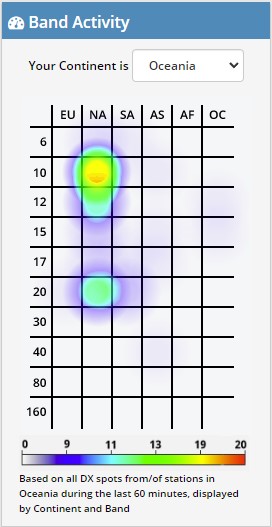
This graph is powerful and shows you instantly where the bands are open.
Select your area via the drop-down box. I have selected Oceania in the example shown. You can see the band is open on 10 metres to NA, which is North America, and slightly open to NA on 20 metres also.
10 minutes before I took this screen dump, 10 metres was in the red to North America, so it changes live. 10 minutes after this screen dump, 20 metres was in the purple meaning conditions were getting harder, however 10 metres became a solid red.
20 minute later after the above screen dump, I took the following one on the right.
Now you can see 10 metres to North America is strong, and 20 metres is not even showing anymore. 15 metres is also on the graph now potentially growing in strength.
Asia is also starting to show signs of colour on 17 metres which it wasn’t before.

While these graphs are powerful, they are limited to the amount of activity on the band. For example, if no one picks up a microphone, then there is still no one to listen to.
It is a great starting point though and displayed very well. I would love to embed this on my QRZ page if anyone knows how.
The main text in the screen, you can hover over the green boxes and filter according to that box. Up towards the top, there is a mode section on the left side with green boxes, you can filter by them also. You can filter via region and band also.
Login
At the top of the screen is a login/sign up option. I would encourage you to create an account. Simply put in your email and password, then confirm it and you will be able to update your profile. You will then have an opportunity to adjust your display DX-Cluster settings as you like.
Other websites
There are other websites that show similar information in a different format that include:
- My DX Summit at http://www.dxsummit.fi/ This page has filters along the top and side.
- DXmaps at https://www.dxmaps.com/spots/mapg.php?Lan=E This has a great visial map of the data and can be filtered by band or location also.
- WSPRnet at https://www.wsprnet.org/drupal/wsprnet/map also has a map. You can filter the data displayed on the map via the filters below it.
- Solar Flux on VK3FS https://3fs.net.au/daily-solar-data/ This page is well written by a fellow Amateur, Andrew, also living in VK3. He explains a lot and goes to a lot of detail. On this Daily Solar Data page there is a usful graph tha shows the Solar Flux over the last month.
Other interesting reads:
Did you enjoy this read, below are some other interesting topics you may enjoy also:
- Maximum Usable Frequency (MUF) in HF Radio Propagation
 Maximum Usable Frequency (MUF) is an important concept in HF radio propagation and amateur radio communications. It refers to the highest frequency that can be used for reliable communication between…
 - World Amateur Radio Day
 World Amateur Radio Day is celebrated every year on April 18, marking the founding of the International Amateur Radio Union (IARU) in 1925. The organisation was established in Paris when…
 - Amateur TV
 Amateur Radio Television (ATV), often called “ham TV,” is a niche part of amateur television where licensed radio operators transmit live video and audio over radio frequencies instead of traditional…
 - Baofeng UV-5R Mini
 The Baofeng UV-5R Mini handheld radio is a popular and affordable dual-band amateur radio transceiver widely used by beginners and experienced ham radio operators. Designed as a compact version of…
 - Lightning Storm & HF Radio
 HF radio and lightning storms are closely connected because lightning creates strong radio frequency interference that affects HF radio communication (3–30 MHz). High Frequency radio is commonly used for amateur…
 - OpenHamClock
 OpenHamClock is an open-source amateur radio dashboard designed as a modern successor to the original HamClock used by radio amateurs worldwide. It provides a real-time visual display of essential ham…
 - Radtel P8 PoC radio
 The Radtel P8 PoC radio is a Push-to-Talk over Cellular (PoC) device that looks like a traditional walkie-talkie but communicates using 4G/LTE mobile networks instead of UHF/VHF radio frequencies. This…
 - What is an Antenna Coupler
 An antenna coupler (also called an antenna tuner or matching network) is a device used in radio systems to ensure impedance matching between a transmitter and an antenna. Most transmitters…
 - Antennas
 Amateur radio operators use many different antenna types, each designed for specific bands, space limits, and operating goals. Here’s a clear overview of the most common ones and why hams…
 - Dipole Antenna for Portable Use – Make your own!
 A dipole antenna is a basic radio antenna made of two conductive elements fed at the center. It is typically a half-wavelength long and is widely used as a reference…
 VK3TBS