
I like to program my radio or scanner via the computer. You can see more, import more and adjust things quickly. One thing you can do on the PC is adjust which channels are in the scan or not, something unfortunatley you can not do on the radio (bit funny).
This all worked fine, however after a windows update, I could no longer connect. Something happened.
I went into the device manager and found the error, my cable no longer worked. This same issue happened to a USB Card reader also.
PL2303HXA PHASED OUT SINCE 2012. PLEASE CONTACT YOUR SUPPLIER.
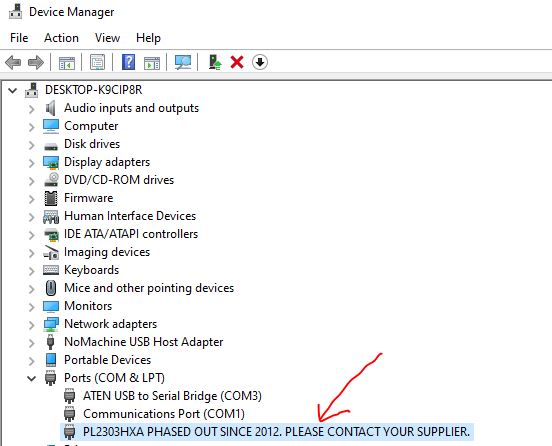
While this is all very informative, it really didn’t help me. However I found a solution.
What windows have done, is for the older chips, Window’s has dropped driver support for them. However you go to http://wp.brodzinski.net/hardware/fake-pl2303-how-to-install/ you can download an old driver version, then install the old driver version.
Once downloaded, open the zip file and run the exe file and install. Unplug the USB cable, and plug it in again.
Then, go back to the Device Manager, right click on the above line, select properties, go to Driver tab, select Update Driver, select Browse my computer for driver software, then navigate to the downloaded file, then select Let Me Pick, then you get a selection as per the picture below. Select the older 2008 version as shown below.
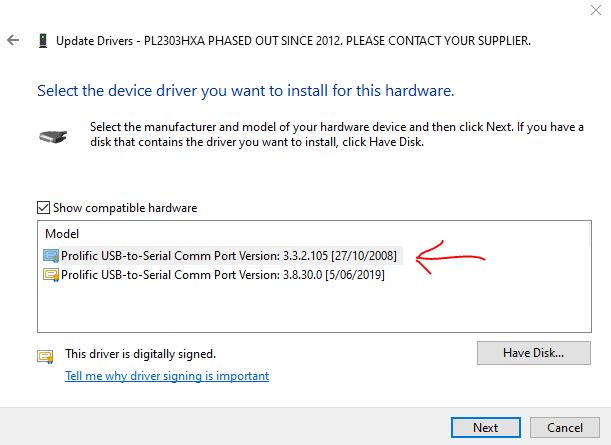
Press Next and let it install. Once complete, click on Close, and Close again, and the Device Manager should now be changed to:
Prolific USB-to-Serial Comm Port (COM?)
You should be able to communicate with the radio fine now. You many have to re-do the above steps if you re-boot the PC or do a windows update.
Option 2
I came acrross this other way to do it also, using a different driver. Both options work for me, however it depends on which cord I am using. So if the first option doesn’t work, you may want to try option two below.
I hope this helps you. This took a while to put together, so please let me know what you thought by adding a comment below. Don’t forget to follow our page also for more updates. There are more hints on this web site also.
- BlueDV Windows 10 GD-77
 I found it hard to find useful information on how to run the OpenGD-77 hotpot mode with Windows 10. At the time of writing this, there is a lot about this topic using a pistar and even android or ISO, but not much with Windows 10. This is my experence with BlueDV and Open GD-77 using a Windows 10 PC.…
 - DudeStar
 Here is a free windows program that will connect your PC to: DMR Yaesu Fusion DStar M17 P25 NXDN You can do all this without…
 - EchoLink CQ
 I’ve been using EchoLink well before smartphones where the only way I knew how to connect to a different station was via the radio. The…
 - Flrig
 Flrig is a transceiver control program designed to be used either stand alone or as an adjunct to fldigi (see my review on this). The…
 - GD-77 Won’t connect to PC
 I have been using my Radioddity now for some years and love it. Though upgrading this to the OpenGD77 opened a whole new world and…
 - HamClock
 HamClock has always fascinated me, as it seems such an amazing program specifically set up for Amateur Radio. I have seen countless videos on it…
 - Iphone won’t download photos
 I get the “Device is unreachable” Error message when trying to import media from iPhone to Windows 10 PC. …
 - NanoVNA H4 USB Control to PC
 If you haven’t seen my previous blog on the NanoVNA Analyser, then I suggest you look at that first before reading this blog. This one…
 - NetTime
 When using digital over the radio, it is particularly important you have the correct time. Even a second out will stop you from making contacts.…
 - OpenHamClock
 OpenHamClock is an open-source amateur radio dashboard designed as a modern successor to the original HamClock used by radio amateurs worldwide. It provides a real-time…
 - ProScan and ProScan Client
 I recently started using ProScan after years of using FreeScan. I have always enjoyed using FreeScan as it is easy to setup, I can download outputs from the software, and the main reason “it works”. However ProScan seems to be more graphical and has different features also.…
 - ProScan and ProScan Client UpdateI recently started using ProScan after years of using FreeScan. I have always enjoyed using FreeScan as it is easy to setup, I can download outputs from the software, and the main reason “it works”. However ProScan seems to be more graphical and has different features also.…
- Software Defined Radio (SDR)
 If you don’t have one of the latest and greatest expensive scanners, you will struggle to listen to a lot of transmissions. While there is…
 - Treehouse
 An unusual name, but a catchy name no less, just like Peanut that was written by the same person, David PA7LIM. If you like Peanut, then you will like this project also. This project, like Peanut, includes some amazing coding and thinking.…
 - USB Device Error PL2303HXA
 I went into the device manager and found the error, my cable no longer worked. This same issue happened to a USB Card reader also.…
 - VARA – VARAC
 Ever heard this sound on HF / VHF / UHF? I know I have more and more recently. After a bit of research, someone told…
 - Welle.io
 Welle.io is a DAB and DAB+ software defined radio (SDR). It runs on Windows, Linux and embedded devices like the Raspberry Pi 2 and 3.…
- Amateur TV
 Amateur Radio Television (ATV), often called “ham TV,” is a niche part of amateur television…
 - Baofeng UV-5R Mini
 The Baofeng UV-5R Mini handheld radio is a popular and affordable dual-band amateur radio transceiver…
 - Lightning Storm & HF Radio
 HF radio and lightning storms are closely connected because lightning creates strong radio frequency interference…
 - OpenHamClockOpenHamClock is an open-source amateur radio dashboard designed as a modern successor to the original…
- What is an Antenna Coupler
 An antenna coupler (also called an antenna tuner or matching network) is a device used…
 VK3TBS
Thanks.
LikeLike
first option worked for me to get my picocricket working on a windows 10 machine which uses the PL-2303HXA chip set. I have found that the PL-2303 has a new driver for windows 10 since may 2020 but not the PL-2303HXA variation.
LikeLike
Thanks for the feedback Beardy.
LikeLike
Thank you a lot, i was having the same problem with a COM to USB cable.
LikeLike
Glad it helped. Thanks for the encouragement
LikeLike
It’s nearly impossible to find well-informed people about this subject, but you sound like you
know what you’re talking about! Thanks
LikeLike
Thanks Hans. Great to know it helped
LikeLike
WE ARE NOT WORTHY!
Thanks for this. I had bought an LED name plate as a novelty a few years ago and didn’t think about it when I upgraded to Windows 10 on a PC without a disc drive. The drivers being stale hadn’t even crossed my mind when I started trying to get this thing up and running again. You’re a life saver.
LikeLike
Glad we could help. Yes a great trick that has saved a lot of old hardware. Thanks for taking the time to let us know.
LikeLike
Thanks, it works.
LikeLiked by 1 person
So glad it helped you. Thanks for letting me know.
LikeLike
Nice explanation. Worked a treat for my USB-serial converter. This dongle has talked to hundreds of devices flawlessly over 15 years. Reinstalled Win10 recently and the driver update meant I could no longer communicate with my house inverter. Being off-grid, this is critical. Thanks – I’m saved.
LikeLike
Thanks Johnno, glad it helped
LikeLike